
With EcoLogic, users can easily manage devices, streamline integrations, and customize settings. Whether you’re setting up a smart home or developing complex automation tasks, this platform offers the tools to control your devices seamlessly. Setup is straightforward, making it accessible for everyone from beginners to experienced developers.
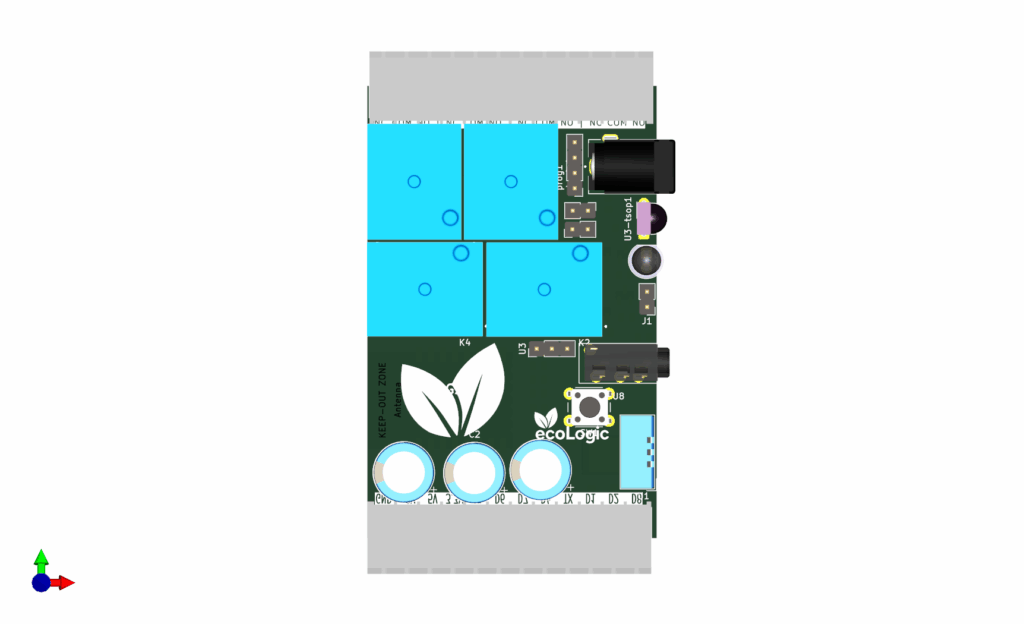
Smart Home Use Cases
Explore how users have enhanced their daily life through smart home technology.
Smart Lighting
Control and set moods.
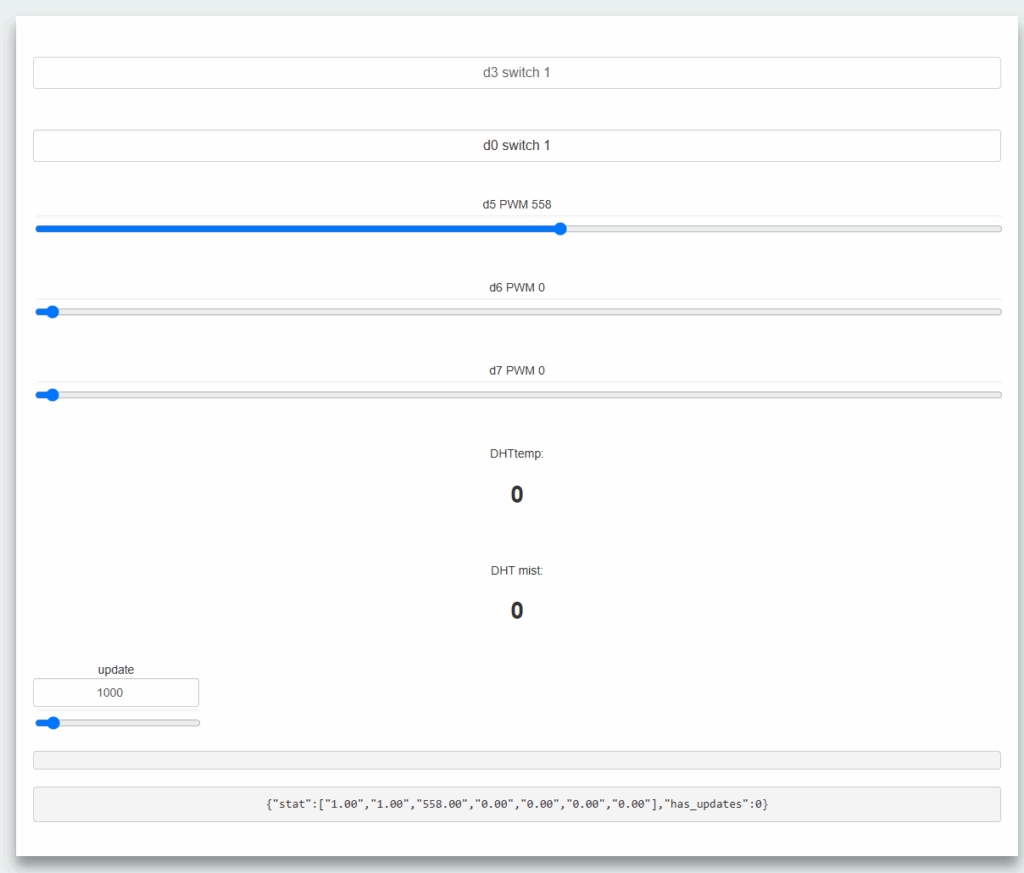
Environmental Monitoring
Track air quality.
EcoLogic Manager
Comprehensive Overview
EcoLogic Manager is a highly flexible, open-source automation platform for the ESP8266 microcontroller. It enables you to create smart, connected devices managed via web, and integrates with Home Assistant and Node-RED. Designed for DIYers, makers, and integrators, it lets you control electrical loads, sensors, and actuators in home or industrial settings—no deep coding required.
Key Features
- Web-Based Control: Real-time device management and monitoring from any browser.
- Flexible Pin Configuration: Digital/analog I/O, PWM, sensors, relays, and more.
- Home Automation Integration: Ready for Home Assistant, Node-RED, and more.
- IR & RF Support: Receive/transmit IR and 433MHz RF codes for automation.
- Email & Notification: Send email alerts directly from the device.
- Modular & Extensible: Add new sensors, actuators, and logic easily.
- Data Storage: Local files (SPIFFS/LittleFS) for persistent configuration and state.
Typical Use Cases
| Scenario | Description |
|---|---|
| Smart Lighting | Switch, dim, or automate lights via web, or buttons. |
| Environmental Monitoring | Read temperature, humidity, air quality, and trigger automations. |
| Appliance Control | Remotely control appliances, schedule, or automate based on sensors. |
| Security & Access | Integrate door sensors, motion detectors, and control locks/alarms. |
| IR/RF Remote Replication | Learn and replay IR/RF codes for device control. |
| Home Assistant Integration | Expose all sensors/controls as entities for automation. |
| Node-RED Flows | Use HTTP endpoints in Node-RED for custom logic. |
Device Control & Integration
HTTP API
- Direct Pin Control:
http://<device_ip>/sendAJAX?json={"t":0,"v":1} - Read Status:
http://<device_ip>/aRest?Json={stat:0} - IR/RF Code Management: Learn, send, and manage codes via HTTP endpoints.
- Email Sending:
http://<device_ip>/sendEmail?Email=MessageText - Reboot/Time Sync:
http://<device_ip>/function?json={reboot:1}
Home Assistant & Node-RED
- Discovery: Manual/automatic entity creation using topics.
- Automation: Use device topics in automations, flows, dashboards.
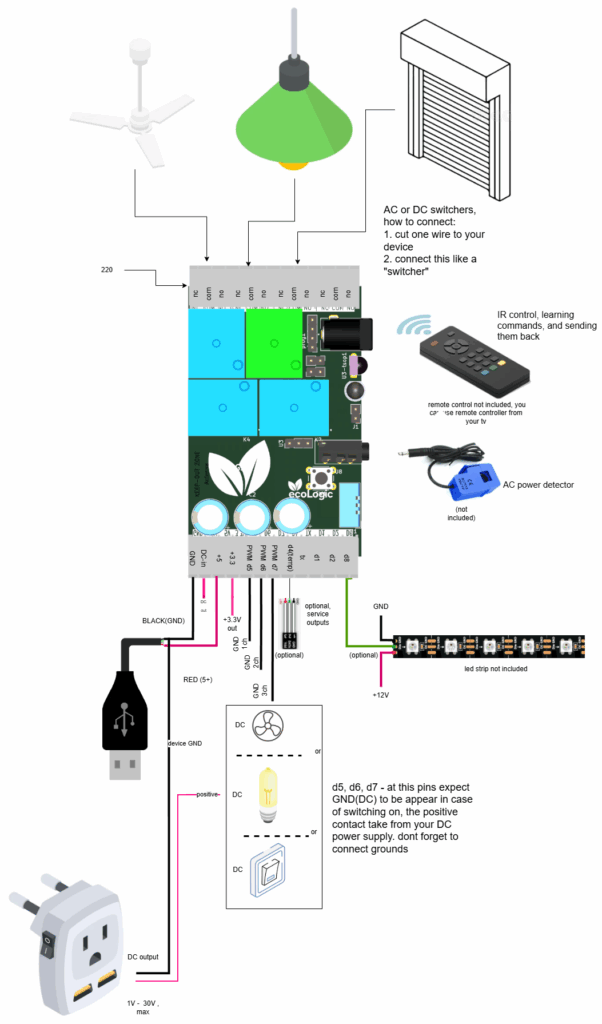
Typical scheme
Pin Setup & Configuration
Configure each pin’s mode, function, widget, and default state via the web interface (pin_setup.htm) and pin_setup.txt.
| Mode Index | Mode Name | Description |
|---|---|---|
| 0 | no | Disabled |
| 1 | in | Digital input (with inversion option) |
| 2 | out | Digital output (relay, LED, etc.) |
| 3 | PWM | PWM output for dimming, speed control |
| 4 | ADC | Analog input (A0) |
| 6 | DHT 1.1 Temp | DHT11 temperature sensor |
| 8 | DHT 1.1 Mist | DHT11 humidity sensor |
| 9 | remote http | Remote HTTP control |
| 10 | power meter | Power metering |
| 12 | MAC address | MAC address reading |
| 16 | ds18b20 | DS18B20 temperature sensor |
Widget Types: switch, button, progress, chart, data, etc.
File-Based Configuration
- pin_setup.txt — Pin configuration
- other_setup.txt — email, and device settings
- wifilist.txt — WiFi credentials
- ConditionX.txt — Automation conditions
- stat.txt — Current pin states
How to Connect & Use
- Power the Device: Connect ESP8266 to USB power and network.
- Access Web UI: Open a browser and go to the device’s IP address.
- Configure Pins: Use the Pin Setup page to assign functions.
- Integrate with Automation: Set up in
other_setup.txtand connect to Home Assistant or Node-RED. - Control & Monitor: Use web UI or HTTP API.
- Advanced: Use IR/RF, email, and custom automations as needed.
Integration Scenarios
| Platform | Method | Example/Notes |
|---|---|---|
| Home Assistant | HTTP, Restful | Add sensor/switch with device topics |
| Node-RED | HTTP | Use device as node in flows, trigger automations |
| Custom Web App | HTTP API | Send AJAX/REST requests to device endpoints |
| IR/RF Remotes | HTTP/IR/RF | Learn and replay codes for remote control |
Extensibility & Customization
- Add new sensors/actuators: Edit pin setup and upload new code modules.
- Custom logic: Use
ConditionX.txtfiles for automation rules. - Backup/Restore: Copy configuration files for easy migration.
Security & Best Practices
- Change default passwords and WiFi credentials.
- Regularly backup configuration files.
Conclusion
EcoLogic Manager transforms the ESP8266 into a powerful, web-managed automation controller. Its modular, file-driven approach and broad integration support make it ideal for smart home, industrial, and educational projects. Whether you need simple remote switching or complex automation, EcoLogic Manager provides a robust, extensible foundation.